
Driving licence status check – Easy Online Steps
Applied for your driving licence but still waiting without any update? Many people don’t know if their licence is approved, rejected, or already dispatched. A quick driving licence status check can help you find out everything in just a few steps.
In this guide, we’ll explain how to check your driving licence status online in India using the sarathi Parivahan portal and mParivahan app. Whether you just applied or are waiting for delivery, this easy process will save your time and give you peace of mind.
Online Method: Parivahan Sewa Portal
The Parivahan Sewa portal is the official website by the Ministry of Road Transport and Highways. It’s the most trusted and widely used platform to do a driving licence status check in India. You can access it anytime, get real-time updates, and there’s no fee involved. It works for both new applications and existing licence holders.
Existing License Status check
- Go to the official Parivahan Sewa portal.
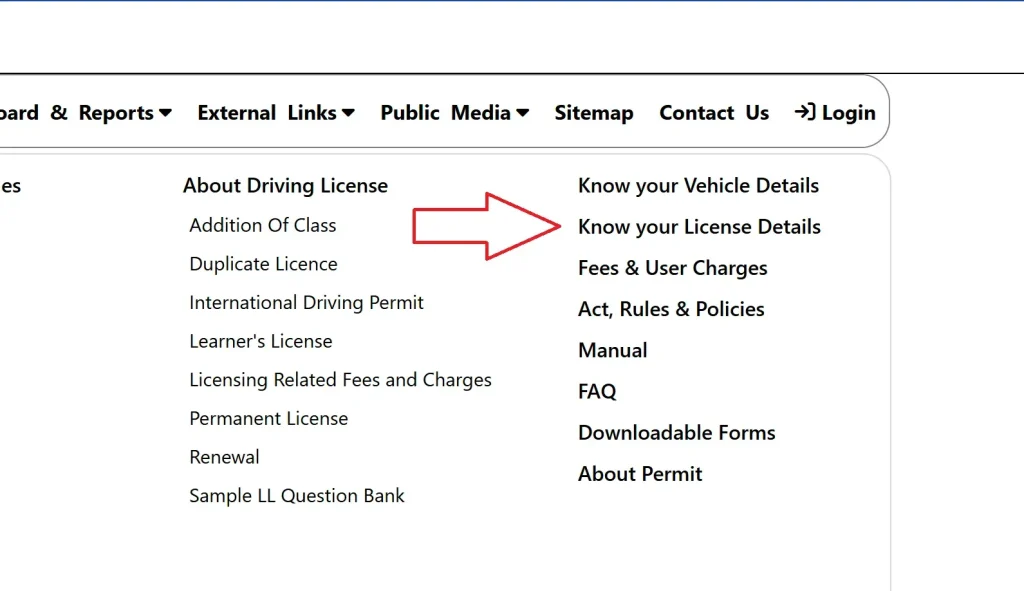
- Under the “Informational Services” tab, select “Know your licence details.”
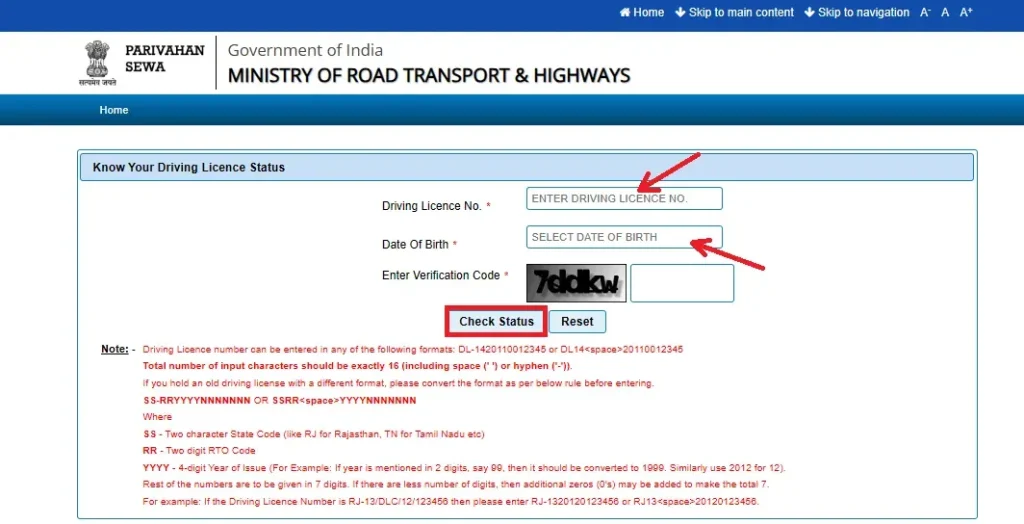
Enter Your Driving Licence Number in the Correct Format
To get accurate results from the driving licence status check, your licence number must be entered in the proper format. Here’s how to do it step by step:
- Start with the State Code (SS):
Use the 2-letter abbreviation for your state.
Examples: DL for Delhi, MH for Maharashtra, RJ for Rajasthan. - Add the RTO Code (RR):
This is a 2-digit number representing your Regional Transport Office.
Example: 13 for Jodhpur, 01 for Mumbai. - Write the Year of Issue (YYYY):
Enter the full 4-digit year when your licence was issued.
If your card shows ‘12’, write it as ‘2012’. - Add Your Unique Licence Number (NNNNNNN):
This is a 7-digit number. If your number is shorter, add leading zeros to make it 7 digits. - Use the Correct Format to Combine All Parts:
- Format 1: SS-RRYYYYNNNNNNN
- Format 2: SSRR YYYYNNNNNNN
- Examples:
- DL-1420110012345
- DL14 20110012345
- Enter Date of Birth and Captcha:
Use your exact DOB as per your application and fill in the captcha for verification.
Example for Practice:
If your printed licence shows RJ-13/DLC/12/123456, enter it as:
RJ-1320120123456 or RJ13 20120123456
How to Check New Driving Licence Status Online
If you’ve recently applied for a new driving licence and want to know the current status, the easiest way is to check it online through the official transport portal. This method is free, available 24/7, and works from your phone or computer.
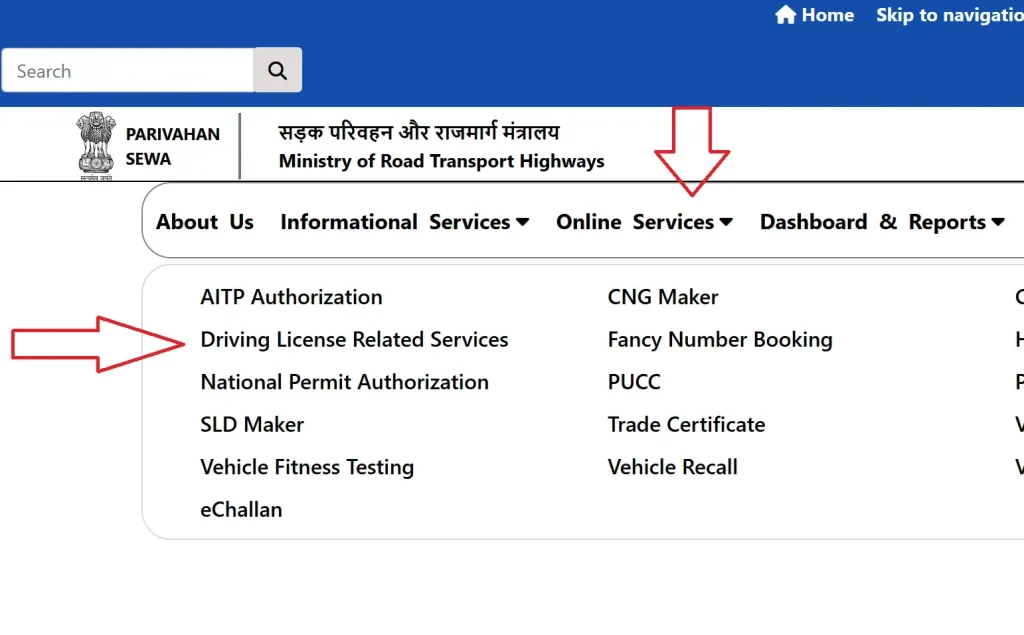
- Go to the official website of parivahan sewa used for driving licence services in India.
- Click on “Driving Licence Related Services” under the Online Services section.
- Choose your state from the dropdown. This will take you to your state’s transport page.
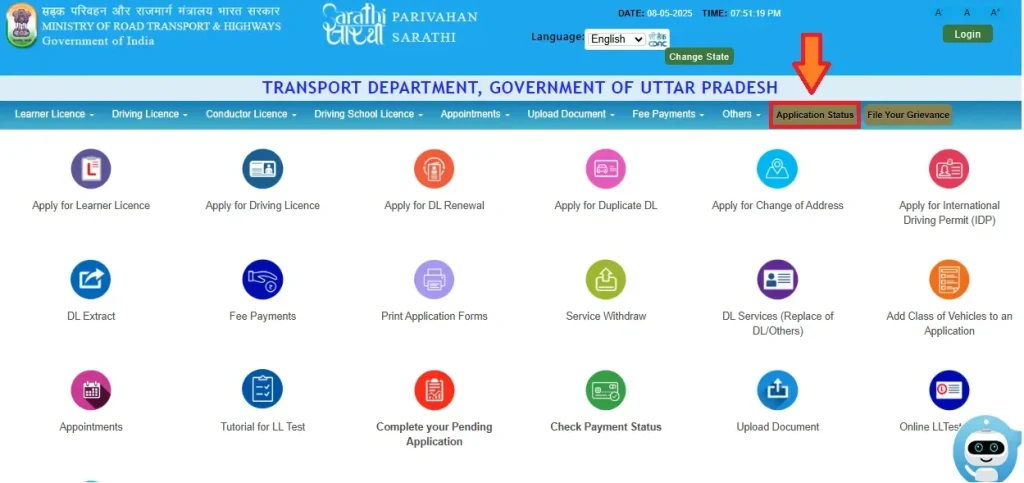
- On the next screen, click on “Application Status” in the menu.
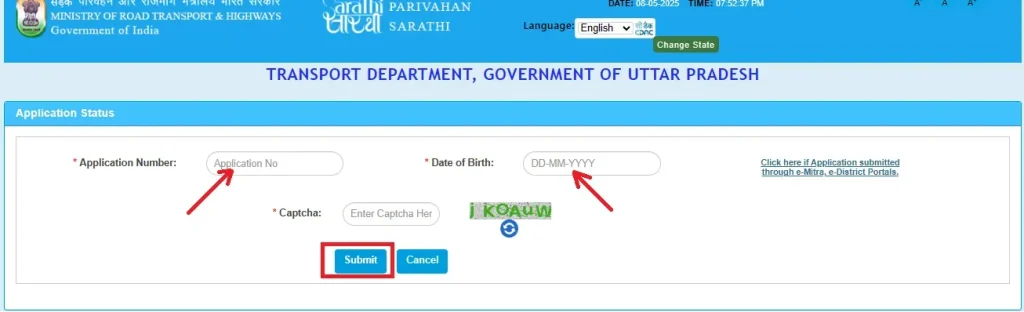
- Your Application Number (you received this during the submission)
- Your Date of Birth
- The captcha code shown on the screen
You’ll be able to see if your application is still under review, already approved, printed, or dispatched. Sometimes, the status may also show if any documents are pending or if there’s a verification step left.
Important to Know:
- It may take a few days after submission for the status to appear online.
- If the format of your licence number is older or different, make sure to enter it using the correct structure explained earlier.
- Check regularly for updates, especially if you’re waiting for dispatch or delivery.
How to Check Licence Status Offline (at the RTO)
If you’re unable to access the online portal or prefer visiting in person, you can also check your status by going to your local RTO office.
Here’s how:
- Visit the RTO that handles your area, ideally 7–10 days after submitting your application.
- Go to the enquiry counter and provide your application number and date of birth.
- If needed, show any identification or submission receipt you received.
- The official will check the system and give you the latest update on your licence application.
| Requirement | Details |
| Application Number | Given after submitting your DL application. Found on the receipt or SMS. |
| Driving Licence Number | 16-character DL number (e.g., MH-0120150123456). Use correct format. |
| Date of Birth | Must match exactly as entered in the application form. |
| Captcha Code | Shown on the status check page; required for verification. |
| Internet Connection | Needed for accessing the online portal without errors. |
| Acknowledgement Slip | Optional but useful for double-checking your application number. |
| Registered Mobile Number | May be needed to receive updates or alerts related to your licence. |
Common Issues While Checking DL Status
Running into problems while trying to check your driving licence status online? Don’t worry — here are the most common issues people face and how you can easily fix them.
1. “No Record Found” Error
This usually means the driving licence number or date of birth was entered incorrectly. Double-check the format of your DL number and ensure your DOB matches exactly as submitted in the application. Even a small typo can lead to this error.
2. Application Not Showing
If your application doesn’t appear, it could be due to a delay in the system. Updates often take 24 to 48 hours after submission or approval. Try checking again after some time.
3. Old Licence Format Not Working
Older driving licences may not follow the new 16-character format required on the portal. If this happens, convert your number using the format instructions provided earlier in this guide.
4. Captcha Not Working or Page Freezing
Sometimes, the captcha may not load properly or the site may become unresponsive. This can be due to browser issues or high traffic. Try refreshing the page, using incognito mode, or switching to a different browser or device.
5. Incorrect Application Number
If you’re getting an invalid application number message, double-check the number on your receipt or confirmation SMS/email. Make sure you’re entering the full and correct number.
6. Status Not Updating
If your status hasn’t changed in several days, it may be due to a backend delay or system sync issue. Wait a couple more days, and if it still doesn’t update, visit your local RTO with your documents for further help.
Track Your Driving Licence Delivery (Speed Post)
Once your DL status shows “Dispatched,” it means it’s been handed over to India Post for delivery.
How to Track:
- Find the 13-digit Speed Post tracking number on your application status page (e.g., EK123456789IN).
- Go to the India Post website.
- Enter the tracking number and click Track to see delivery status.
Delivery Time:
Usually takes 5–10 working days, depending on your location.
Missed Delivery?
Visit your local post office with ID, or call the number on the delivery slip for redelivery.
Latest Updates You Should Know About (2025)
Staying informed about the latest changes in driving licence services can help you avoid delays, missed updates, or penalties. Here are some of the most important updates this year that directly affect how you check or receive your driving licence status in India:
Mobile Number Linking Now Mandatory
To receive real-time updates about your driving licence application, dispatch, or any issues, it’s now mandatory to link your mobile number to your driving licence and registration certificate. This helps ensure you get alerts for:
- Application status progress
- Licence printing or dispatch
- Delivery tracking info
- E-challan notices and renewal reminders
You can update your mobile number online via the Sarathi or Vahan portal using Aadhaar verification, or by visiting your local RTO. Without a linked number, you may miss important updates.
Sarathi Services Now Accessible Across More RTOs
In cities like Hyderabad, all RTO offices are now integrated with the Sarathi platform, meaning you can check your DL status, apply for renewals, or make changes from any RTO not just the one where you applied. This brings flexibility, especially for people who move cities or states often